How to create an AI influencer: from a character to a posted video
10 min read
To create an AI influencer, you describe the person you want and, once the character is drawn, put it into a real trend video. On Duble AI the drawing takes about 20 seconds and the first video is ready in 1 to 3 minutes, from $3.33. Creating the influencer costs nothing, up to 3 images across tries and adjustments.
Four ways to create an AI influencer
The app has four routes, and they all end in the same place: a character with a name, ready to go into videos and photos. The app calls it a double. On the creation screen, New double, each route is a tab.
| Way | Tab | What you do |
|---|---|---|
| Describe | Describe | Write one sentence about who they are |
| Build | Build | Pick age, hair, outfit and details, or tap Shuffle everything |
| Your photos | My photos | Upload a face photo and, if you like, a full-body one |
| Cast | Cast | Pick a portrait and tap the Use button with their name, like Use Enzo Puff |
The steps below follow the first route, which gives you the most freedom. If you would rather start from the site, the Create my double button opens the start path, which shows examples, asks who your influencer is going to be and asks for the purchase before anything is drawn.
How to create an AI influencer from a description
- Open the creation screen and tap the Describe tab. You don't need an account to start.
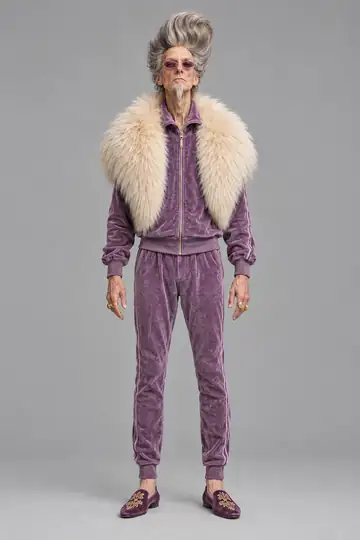
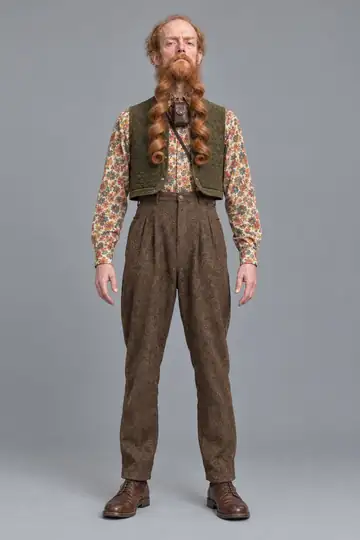
- In What they look like, write in your own words, as if you were explaining it to a friend. The app's own example describes a man of 60 with a huge mustache, an orange plaid suit, aviator glasses and the pose of a TV host. A person, one strong visual detail and an attitude are enough, and how to describe an AI character well covers the method. The text is read as you type, and a refusal shows up under the field.
- Tap Generate double. The screen reads Drawing your double for about 20 seconds.
- Look at the drawing. To change one thing, tap Change something and write only that change, like "pink hair": it stays the same person. For another version of the same description, tap Generate another. Earlier tries stay under Versions, and the one on screen is the one that is kept.
- At What's it called?, type a name in Double's name and tap Save double. If you aren't signed in yet, the button reads Save and pick a trend and you sign in right after.
- You land on the influencer's page, ready to use. Only the video button says Finishing… for a moment, while the picture is redrawn at the quality videos are made in.
Every try and every adjustment uses one of your 3 images that cost nothing. After those, they use credits.
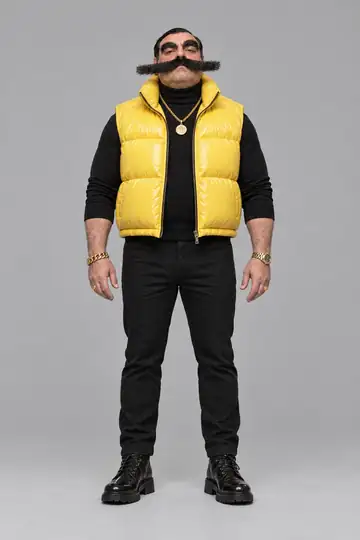
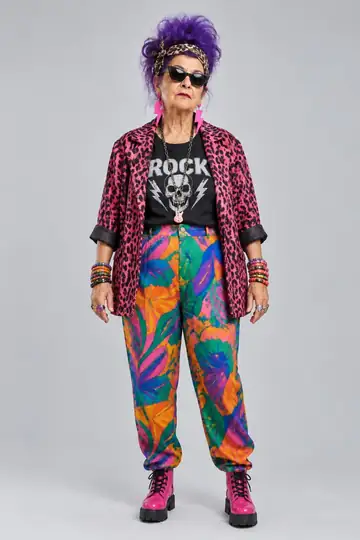
The cast shows the kind of person that is easy to describe. Enzo Puff ("Runs the neighborhood and the family group chat") and Marlene Volume ("Building manager and lead singer of the band") each fit in one line.
Building one, using your photos or taking one from the cast
Build it part by part
On the Build tab you choose who they are, their age, body, hair, outfit and one detail. Most options show a thumbnail of the same person with only that part changed. Nothing is required: what is already selected makes an influencer, and Shuffle everything changes it all at once. Nose, ears, mouth and jaw are folded away under Face details (optional). The Anything else? (optional) field takes a loose sentence, like an anchor tattoo on the arm, and a box shows the sentence that will be drawn.
Make it from your own photos
On the My photos tab, only the Face photo is required. The Full body photo helps, because with the face alone the body is made up and may not look like yours. You can also add More images (optional), from the side and up close. Each photo can be up to 8 MB, as JPG, PNG or WebP, showing one person. Before you generate, tick the box saying the images are yours or that you have permission to use them. The influencer comes out resembling you, but it is not a perfect copy. Photos of someone else only with their permission, and never of celebrities. Which photos to send and what rights you need is covered in its own guide.
Take one from the cast
On the Cast tab, tap a portrait and then the Use button with its name, like Use Enzo Puff. The influencer is yours right away, with nothing to draw and no credits spent, and it works like any other double. For something different, the Change something? (optional) field draws a new one, inspired by the one you picked, with whatever you ask for.
How to make the first video
With the influencer saved, the video is the short part: you pick the trend, and the app remakes the clip with your influencer in place of whoever is in it, in the trend's scene (which can change a little) and with audio based on the source clip. How to make AI trend videos shows every button. In short:
- On Home, tap the influencer and pick a trend under Trending. Each card shows its length and the price in credits. To make the video you sign in, with Google or email.
- Answer What plays in this video? with Someone speaks or sings or Only music or background sound. The generate button stays off until you do.
- Choose a quality: Standard, High or Turbo. Each button shows the price.
- Tap Generate video. It takes 1 to 3 minutes, or seconds at Turbo. If you are short of credits, the button turns into Buy credits and says how many are missing. If the video fails, the credits go back right away.
- On a phone tap Save video. On a computer it is Download video. There is no watermark.
A trend with several people shows what the app does: your influencer appears next to real people, who stay in the scene. Here Enzo Puff, in his pink-suit look, takes the place of one of three people in a living room.
After the first trend, the same influencer can go into a video of your own, filmed on your phone, from 3 to 30 seconds long, in the scene and with the sound you filmed. If the trend is a dance, the guide to an AI dance video says what the photo and the clip need. To keep the face the same, every look automatically gets two sheets showing the influencer from every side, and how to keep one AI influencer consistent covers the rest.
How to set up the influencer's profile
The influencer has a page of its own in the app as soon as it has a name. It shows a round picture, the name, the bio and the Instagram handle, with three tabs: Videos, Photos and Looks. To fill it in, tap Edit, which opens Edit profile. The Bio says who they are and what they do. The Instagram field takes the @ of an account you made for your double, and it becomes a link on the profile. Nobody checks whose account it is.
The app does not create the Instagram or TikTok account. Open the account on the platform with the same name and bio. For the grid and what to post on it, see how to set up a faceless Instagram with an AI character, and for TikTok, a faceless TikTok with an AI character.
The Share button makes a public link to the profile, with the videos and photos you leave visible. Whoever opens the link can take a copy of the influencer for their own videos. An influencer made from your own photos has a public profile, but nobody can take a copy of it. To stop, use Stop sharing.
What should an AI influencer post in the first week?
Plan the first week around the character you saved. Try different clips without changing the character at the same time, so you can tell whether the footage or the look needs work.
The list below is a sample schedule, not a recipe for reach. Skip formats you do not need and add up the credits before producing the week.
- A trend from Trending, in the original look. This is the introduction video.
- A photo for the feed, with the influencer in your photo (2 credits). AI influencer photos shows the two ways of getting into one.
- A second trend of another kind, such as an interview or a walk, so the influencer is not only dancing.
- A video of your own, filmed on your phone, with the influencer in your place.
- A new look (2 credits) in a new trend. How to change outfit and hair without changing the face explains how.
- The influencer with a product in hand, if you have one to show: AI UGC videos.
- Another trend, chosen by what people commented on most during the week.
How do you label AI content?
Mark posts as AI-made where the platform asks. The app reminds you on every finished video's page. According to Meta's community standards, as of October 2026, anyone posting photorealistic video or realistic-sounding audio must say so with the AI disclosure tool, and Meta may apply penalties if they don't (Meta). TikTok asks creators to label realistic AI content, according to its May 2024 announcement (TikTok). YouTube asks for disclosure when AI meaningfully alters or generates photorealistic content, according to its help center in 2026 (YouTube). The steps for each platform are in AI labels on Instagram, TikTok and YouTube.
Duble AI's Terms forbid using another person's name or likeness without their permission, and never a celebrity's. The platforms' rules, advertising rules and likeness rights are brought together in is an AI influencer legal.
What does it cost to create and run an AI influencer?
Creating the influencer costs nothing, up to 3 images across tries and adjustments, and taking one from the cast costs nothing at all. Everything else is paid in credits, and credits never expire.
| What | Credits |
|---|---|
| A new look | 2 |
| A photo in the Instagram post format | 2 |
| An object, such as a product | 2 |
| A 10-second trend, Standard quality | 20 |
| The same trend in High | 50 |
| The same trend in Turbo, ready in seconds | 60 |
| A video of your own, per second, at Standard | 2 |
Credits come from a monthly plan or a one-time pack. The $49.99 plan gives 300 credits a month, enough for 15 ten-second trends at Standard, which comes to $3.33 each. The $19.99 plan gives 100 credits, or 5 trends. The one-time pack "A week of posts" is $29.99, holds 160 credits and makes 8 trends. For the week above, add up the credits of each item in the table: a video of your own is charged by the second, so the total changes from one week to the next. In Brazil the one-time pack can be paid with Pix or card and the plan only by card; elsewhere both are paid by card. What an AI influencer costs to run works out the cost per video and per month, with other ways of posting beside it.
Can an AI influencer earn money?
You need a buyer or an eligible payout program. The monetization guide shows how to plan a client video, a sponsored post or an affiliate offer. Duble AI does not promise reach, followers or income.
To start, create your influencer and choose the first clip.
Frequently asked questions
- Do I need to write prompts to create an AI influencer?
- No. You describe the person in your own words, as you would to a friend, or build it by picking options, or take a ready-made one from the cast. For the video itself you only pick the influencer and the trend.
- Can I create an AI influencer for free?
- Creating one costs nothing, up to 3 images across tries and adjustments, and anyone from the cast is yours at a tap. Videos and photos cost credits. There is no free video and no free video trial.
- How much does an AI influencer cost to run?
- Once it exists, the cost is in the videos. A 10-second trend at Standard quality is 20 credits, which comes to $3.33 on the 300-credit monthly plan. Credits never expire.
- How long does it take to create an AI influencer?
- Drawing the influencer takes about 20 seconds. A trend video is ready in 1 to 3 minutes at Standard and High quality, and in seconds at Turbo. If a video fails, the credits go back to your balance right away.
- Can I make an AI influencer that looks like me?
- Yes. A photo of your face is enough, and a full-body photo helps. The influencer will resemble you, but it is not a perfect copy. Only use photos of yourself or of people who agreed, and never of celebrities.
- Do I have to label an AI influencer's posts as AI?
- Yes, where the platform asks. Instagram, TikTok and YouTube each have a way to mark AI-made content, and Duble AI reminds you on every finished video's page. The video comes out with no watermark.