AI haircut trend: photo previews, videos and limits
4 min read
The AI haircut trend simulates a haircut in a video, while a hairstyle preview changes the finished look in a photo. Choose a tool by the output you need: Duble AI can prepare a different hairstyle for an influencer, but it does not promise to generate the cutting sequence from a selfie.
| Your goal | The feature to look for | What to inspect |
|---|---|---|
| Preview a bob haircut | Photo editing | Face, length and finish |
| Show hair being cut | Video transformation effect | Scissors, hands and change over time |
| Wear short hair in existing footage | A new look and person replacement | Approved image and authorized source |
| Document a real haircut | Actual footage | A generated preview does not record salon work |
When was this haircut trend covered?
The Brazilian coverage checked here dates to September 2026. CNN Brasil on September 4 described bob haircut videos and named MIU AI. Alô Alô Bahia published a guide the same day.
Those dates establish when the outlets covered it, not who posted the first version. This is an October explainer of that format, without a claim of a new October launch. To investigate other clips, use the guide to finding trends to distinguish a recent repost from the original recording.
Which app was used for the haircut effect?
MIU AI was named in that reporting. As checked on October 24, 2026, its Brazilian App Store listing describes an iPhone app with in-app purchases and image and video features. The listing does not establish that the specific haircut template is currently available to every account.
An old article's purchase amount is not a current quote. Open the effect and check what it consumes before buying. Confirm whether a subscription includes the generation or whether additional credits are needed. We did not verify the current total cost to complete that effect, so this page supplies no figure for it. Readers elsewhere should check their own storefront and account.
How can I check the output before paying?
Start with the file you want to keep. A still image may be enough to compare bangs with a bob. If you want the moment when hair falls, inspect a video demonstration that includes that action. A before-and-after montage may simply be two stills with an editor transition.
- Watch the whole example, from the original hairstyle to the final frame.
- Check whether the feature describes an image edit, video generation or editing template.
- Use a photo of yourself with the face visible and hair inside the frame.
- Read the service's upload and privacy terms before sending photos.
- Confirm the account's price and renewal terms before purchasing.
- Review the output before sharing it as a simulation.
The image cannot tell you how your real hair will behave. Use it to discuss a style with a hair professional rather than presenting it as evidence of a completed haircut. Only use someone else's image with permission.
What can Duble AI do with a hairstyle?
Duble AI, the product published by this site, can prepare an influencer with a different hairstyle for existing footage. The app calls your influencer a double. Its looks feature changes the appearance reference, while the video uses movement from your chosen recording.
For example, you can request a look with a short, straight bob. That prepares the finished appearance. Showing an actual cutting action would require suitable authorized reference footage, and we do not promise correct scissors or hair continuity even then. We have not verified a dedicated haircut-trend button in this workflow.
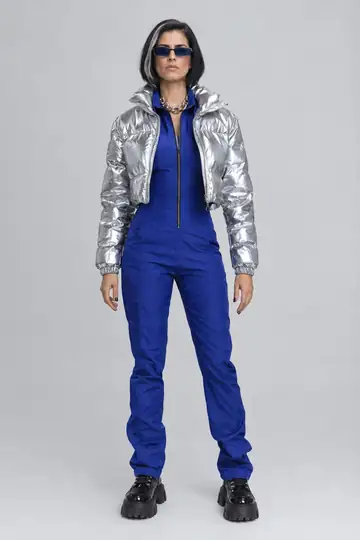
To use the look-based workflow:
- Create your influencer from an original identity or your own image.
- Open New look and describe the hairstyle. Create look displays the cost, 2 credits.
- Approve the image before choosing Make a video with this look.
- Select authorized footage and check the generation cost.
- Inspect the whole result, especially hands and hair passing in front of the face.
New videos use Duble Identical with Standard or High quality, displayed as Full HD. Uploaded clips can run from 3 to 30 seconds. The output keeps the original recording's sound; Duble AI does not create scissors sounds, music or a new voice.
What does this workflow cost?
The look and the video are separate steps. The look uses 2 credits, and a 10-second Standard video uses 30 credits. Check Duble AI pricing before proceeding. There is no free video and no guarantee that a completed attempt will match your intended effect.
If you simply want to appear in a scene wearing the approved hairstyle, see putting yourself into a video. If the changing haircut is the point, verify an effect that demonstrates the full transformation before buying it.
Frequently asked questions
- Does AI show a haircut happening or just change a photo?
- Those are different outputs. A photo tool changes the finished appearance in one image. A video effect can generate a sequence showing scissors and a transformation. Changing an influencer's look in Duble AI prepares a reference image; it does not automatically animate someone cutting their hair.
- How do I make the AI haircut trend video?
- Look for a video effect that demonstrates the transformation, then use your own or an authorized photo. Confirm that the effect is available in your account and check the complete cost before paying. A feature that only changes a still photo does not provide the haircut sequence.
- Which app was associated with the bob haircut trend?
- Brazilian reporting in September 2026 named MIU AI. That identifies a tool associated with the coverage, without proving it originated the trend. Confirm the current offer in the official store and app, because available effects, credits and pricing can change by account and region.
- Can my AI influencer wear a new hairstyle in a Duble AI video?
- You can prepare a look with the hairstyle you want, then use that reference in authorized footage. The result follows the existing recording and keeps its sound. This does not promise animated scissors or a gradual change from long to short hair in the generated video.