How to put yourself in a trend video with AI: your face, step by step
5 min read
To put yourself in a trend video with AI on Duble AI, you upload a photo of your face, the app draws a double that resembles you, and that double takes the place of whoever is in the trend. The video takes 3 to 5 minutes, and the result looks like you without being an exact copy.
How do I put myself in a trend video with AI?
In the app, this version of you is called a double. The steps below are for a trend from the library.
- Open the double maker and tap the My photos tab. You do not need an account to start.
- Tap Face and choose your photo. If you have one, add a Full body photo too. More images (optional) takes up to 5 more, from the side, from behind, up close or from far away.
- Tick the permission box and tap Generate my double. The box says the images are yours or that you have permission to use them. Drawing takes about 20 seconds, and the first drawing costs nothing.
- Check that it looks like you. If not, use Send more photos, Change something or Generate another (the last two use credits). When you like it, type a name under What's it called? and tap Save double. If you are not signed in yet, you see Save and pick a trend instead, and sign-in comes after.
- Pick the video. The screen asks "Which video does (your double's name) go into?" Tap a trend under Trending or Community, or tap Use your own video (explained below).
- Check the price. Under Quality you choose Standard (720p) or High (1080p), each with the credits the video costs. If you are short, the app shows how many credits you are missing and opens the purchase.
- Tap Generate video. The button shows the price, for example "Generate video · 30 credits" for a 10-second trend at Standard. You can leave the page: the video keeps being made.
- Save it and post. When the video is ready, Save video (on a phone) or Download video (on a computer) keeps the file, with no watermark. Label it as AI-made content where the platform asks, as the AI label guide explains.
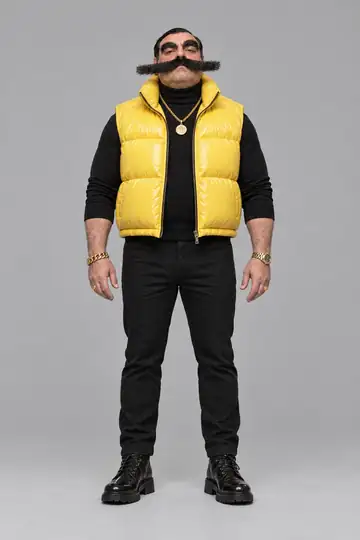
Above, Vector, from the cast, goes into a trend. With a double made from your photos the path is the same. The trend-only walkthrough is in how to make AI trend videos.
Which photos do I need to upload?
Only the face photo is required: up close, facing the camera, in good light. Each image should have one person, as JPG, PNG or WebP, up to 8 MB. Without the full-body photo, the app warns that the body is made up and may not look like yours. The photo details are in create an AI influencer from a photo.
Will the result look exactly like me?
It looks like you, and Duble AI promises no more than that. The double is a drawing made from your photos, and the video is made from that drawing. More photos bring the result closer to you, and Send more photos makes the next drawing use all of them.
What can go wrong:
- The app refuses photos with nudity, a sex act, or more than one main person, and nothing is charged.
- The models may refuse faces of celebrities or faces close to them, even on an invented double. Nothing is charged then either.
- If the video fails or runs past the waiting limit, no credits are lost: they go back to your balance.
- The scene and the movements come from the video, and you do not choose another place. Check the result with sound before you post.
Can I put myself in a video I filmed?
Yes. Instead of step 5, tap Use your own video, then Choose a video (your gallery) or Record now (the front camera). The video must be an MP4 or MOV, 3 to 30 seconds long and up to 80 MB. If it is longer, the app uses the start.
The app asks How many people are in the video? with Just one or More than one. With more than one, you write who the double replaces, for example "only the person in front, in the white T-shirt." Because the double resembles you, one warning matters: if you are the person in the video, the app may tell you it takes about a minute longer and that the result can come out with some of the original person's features mixed in. The guide to replacing a person in a video has the full walkthrough.
How much does it cost and how long does it take?
The price is per second of video: 3 credits at Standard and 6 at High. A 10-second trend is 30 credits at Standard and 60 at High. On the larger monthly plan, Standard comes to $4.44 a video. A one-time pack such as 130 credits gives 130 credits for $19.99.
Drawing the double takes about 20 seconds, and the video takes 3 to 5 minutes. Credits never expire.
How is this different from a face-swap app?
A face-swap app changes only the face and leaves the body, clothes and hair of whoever filmed. Duble AI replaces the whole person with a double that resembles you, with its own body and clothes, and it has no face swap. The full comparison is in face swap vs character swap.
Can I use anyone's face?
No. Use only photos of yourself or of someone who agreed, preferably in writing. Celebrities and political figures are out in every case, and so are other people's characters and brands, according to the Terms. The app does not check whose face it is, and whoever uploads and posts is responsible for what is published. The legal and platform limits are in is an AI influencer legal?.
To get started, make your double.
Frequently asked questions
- How do I put myself in a trend video with AI?
- On Duble AI you upload a face photo on the My photos tab, generate your double, pick a trend or one of your own videos and tap Generate video. The double, which resembles you, takes the place of whoever is in the video. It takes 3 to 5 minutes.
- Does Duble AI put my exact face in the video?
- No. The app draws a double from your photos. It resembles you and is not a perfect copy, and sending more photos gets it closer. Duble AI has no face swap, which changes only the face and leaves the body of whoever filmed the video.
- How much does it cost to put yourself in a video with AI?
- Your double's first drawing costs nothing. Each video uses credits: a 10-second trend at Standard quality is 30 credits, from $4.44 on the larger monthly plan. No video is free, and credits never expire.
- Can I use someone else's photo to put them in a video?
- Only with their permission, and never celebrities or political figures. Before generating, you tick a box saying the images are yours or that you have permission to use them. The app does not recognize faces, so following that rule is up to whoever uploads.
- How long does the video take?
- Drawing the double takes about 20 seconds. The video takes 3 to 5 minutes, and you can leave the page while it is made. If the video fails or is refused, the credits go back to your balance.